Showing posts with label Linux. Show all posts

Saturday, September 10, 2016

Rocket Ship: When to Flee

Yesterday I ran across the following quote:
"If you're offered a seat on a rocket ship, get on, don't ask what seat." -  Sheryl Sandberg
Which leads me to a related point:
"If you're on a poorly maintained, poorly fueled, poorly aimed rocket ship... for goodness' sake GET OFF RIGHT NOW."  - Me
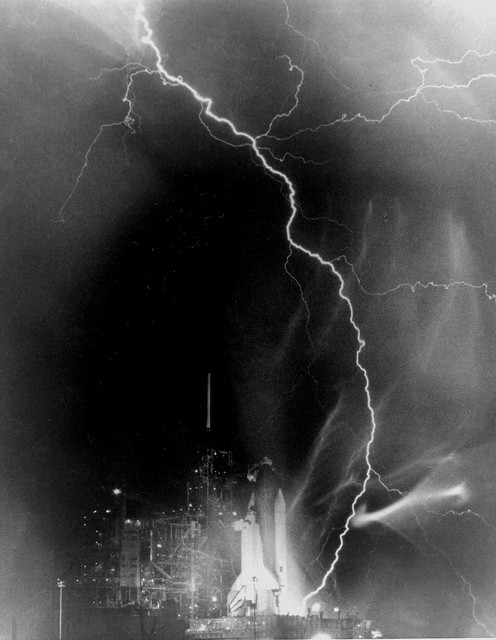
Electrical Storm at Kennedy Space Center
If this happens while you're taking off, flee!
 (Image Credit: NASA)


Recently I quit my engineering job at a Fortune 500 company. Although I've had a few days where, fueled by boredom and loneliness, I have wished I was still there, I'm very happy to be free.

Don't get me wrong, I'm a believer in intelligent, well-educated women.  I enjoy what I learned in graduate school, and I'm looking forward to applying it in the future.  But I was sacrificing my health to remain at that job, and I only have one body to live in.

I don't want to get personal about what went wrong.  I'm trying to forgive those involved.  But I can't work somewhere where creative, hard-working, prolific people are constantly put down (even though it's unintentional).

Engineering ladies, if this describes you, find a different job before you burn out!  It's really hard to wait for your self-worth and motivation to grow back.

Thursday, April 7, 2016

Fixed: Gimp 2.9 crashes and/or segfaults on Fedora 23

I love GIMP 2.9 because the user interface is way more modern than GIMP 2.8.  Because GIMP 2.9 will never be released (it paves the way for a future GIMP 2.10), I built it myself over six months ago.

However, it started crashing after our recent updates to Fedora 23.  GEGL was broken, causing the application to hang.

This fortunately has a pretty quick fix as I discovered today.  Just rebuild and reinstall GEGL system wide.  The GEGL developers have patched the problem in the master branch.

It's working again :)

Wednesday, March 2, 2016

Learning Vulkan for Fun XOR Profit: Part 2, Getting a Spinning Cube to Run

Let's work on getting your environment set up.  I'm using an Intel Broadwell GPU and Fedora 23.
  1. Build your Vulkan driver:
        a. Get your Vulkan driver:

git clone git://anongit.freedesktop.org/mesa/mesa
cd mesa

git checkout -b vulkan origin/vulkan

        b. Install your dependencies:

sudo dnf install libxshmfence-devel 

        c. Configure it

./autogen.sh

        d. Build it

make -j4 

     2. Get a linker.  Vulkan, like OpenCL, requires a system to go out and find the correct Vulkan install:

sudo dnf copr enable ajax/vulkan
sudo dnf install vulkan-devel


     3. Get your spinning cube program.  I'm using Kristian Hogsberg's vkcube:

cd
git clone https://github.com/krh/vkcube.git
cd vkcube

./autogen.sh
make -j4

    4.  Tell your spinning cube where Vulkan is:

export VK_ICD_FILENAMES=/home/[username]/mesa/src/intel/vulkan/dev_icd.json

    5. Run it!!

./vkcube

You should see something like this, a multicolored spinning cube:


Tuesday, February 16, 2016

Announcing a New Series: Learning Vulkan for Fun Xor Profit


Today was the big unveiling of the new Khronos graphics API Vulkan, the successor to OpenGL. I've decided to do a tutorial series on learning the new API for your reference (and my enjoyment).

I'm going to exclusively use the new Intel open source driver, Anvil, which is part of the Mesa project.  To use Anvil, you need to have an Intel integrated graphics card of generation IvyBridge or later.

To start, git clone git://anongit.freedesktop.org/mesa/mesa and checkout and build the Vulkan branch.